Product

How Odigon works, step by step

From the first quote to the carrier payment, plus the compliance rules, the built-in detail and what the finance and tax features do and don't do.

How it works

One load, one system

Every step of a load in one place, whether your own truck runs it or a carrier does. Click a step to watch it.

  1. 1Quotecontract · spot · fleet
  2. 2Tendervetted carriers only
  3. 3Dispatchcompliance checked
  4. 4TrackGPS / ELD milestones
  5. 5Auditinvoice vs agreed rate
  6. 6Payfeeds the 1099-NEC list

Each step in detail

  1. 1

    Quote

    Rate every mode at once: contract lanes, spot market, LTL tariffs, parcel, intermodal and your own fleet.

  2. 2

    Tender

    Offer the load to one carrier or several, log their bids and award the best one.

  3. 3

    Dispatch

    Assign driver, tractor and trailer. Odigon checks CDL, medical card, hazmat and hours first.

  4. 4

    Track

    GPS/ELD milestones, geofences, ETA prediction and exceptions, with automatic detention.

  5. 5

    Settle

    Audit the carrier invoice, approve it and record the payment. Payments are totaled for the year-end 1099-NEC list.

Plan smarter: the Route planner suggests fleet trips and carrier bundles for the next days' loads, and puts a load on your trucks only when that's cheaper than a carrier.

Compliance gate

Blocked, warned or good to go

Odigon checks the carrier, the driver and the equipment at every tender and every dispatch, and re-checks carriers with FMCSA every 7 days.

Swipe to see the whole diagram →

WHAT IS CHECKED CarrierFMCSA authority · insurance · W-9DriverCDL · medical card · hours leftTruck & trailerDOT inspection · weight · status ODIGON CHECKS At every tender and every dispatch + FMCSA re-check every 7 days ✕ Blockedexpired insurance, CDL or medical card! Warnedexpiring in 30 days · PM due✓ Good to gotender sent · truck dispatched Hours of service is a planning aid. The ELD remains the legal record.

Compliance, explained

What Odigon checks, how often, and what it stops

Clear rules, so your team knows when Odigon decides and when you do.

Where the data comes from

  • Carriers: operating authority, safety rating, insurance on file and out-of-service status come from FMCSA's official QCMobile service, using your FMCSA web key.
  • Insurance certificates (COI, BMC-91), W-9s, driver CDL, medical card, MVR and drug test, and DOT inspection dates are the records your team enters or imports.
  • Odigon checks those dates and amounts against your business rules. It doesn't look drivers up in state or federal driver databases.
How often it's checked

  • FMCSA: a daily job re-verifies every carrier whose last check is older than 7 days. You can also re-check up to 100 carriers at once, anytime.
  • When FMCSA shows a problem, an Approved carrier is suspended automatically. Nobody is re-approved automatically.
  • Recorded dates are checked continuously: compliance alerts list what expires within 30 days (configurable), and every tender and dispatch checks again at that moment.

Blocked: Odigon won't let it happen

  • Tendering to a carrier that isn't Approved, lacks active FMCSA authority or current insurance
  • Approving a carrier with a critical compliance issue
  • Dispatching a driver who is inactive or already on a load, has an expired CDL or medical card, lacks the hazmat endorsement, or has less than an hour left in the 60/70-hour cycle
  • Dispatching a tractor or trailer that isn't active, has an overdue DOT annual inspection, or can't carry the load's weight
  • Approving payment to a carrier with no W-9 on file

Warned: you decide

  • Insurance, CDL or medical card expiring within the warning days
  • A trip that needs more driving hours than the driver has left (plan a relay or a 10-hour break)
  • Preventive maintenance due soon or overdue
  • Late arrivals and other amber warnings in the Route planner
  • Low-severity issues, such as an MVR review older than a year

Hours of service in Odigon is a planning aid; the ELD remains the legal record of duty status.

Built-in detail

The details that protect every dollar

Fuel surcharge from the weekly EIA diesel price

Odigon refreshes the U.S. diesel average every Monday and applies your surcharge schedules automatically, so every customer and carrier sees the same math.

  1. Diesel at $3.80
  2. (3.80 − 1.20) ÷ 0.06 = 44 increments
  3. $0.44 per mile

Automatic detention

Dwell beyond the free time is charged in quarter hours, to the customer and from the carrier.

Hours of service

Drive, window, break and 60/70-hour cycle clocks for every driver, refreshed every minute. A planning aid: your ELD remains the legal record of duty status.

Separation of duties

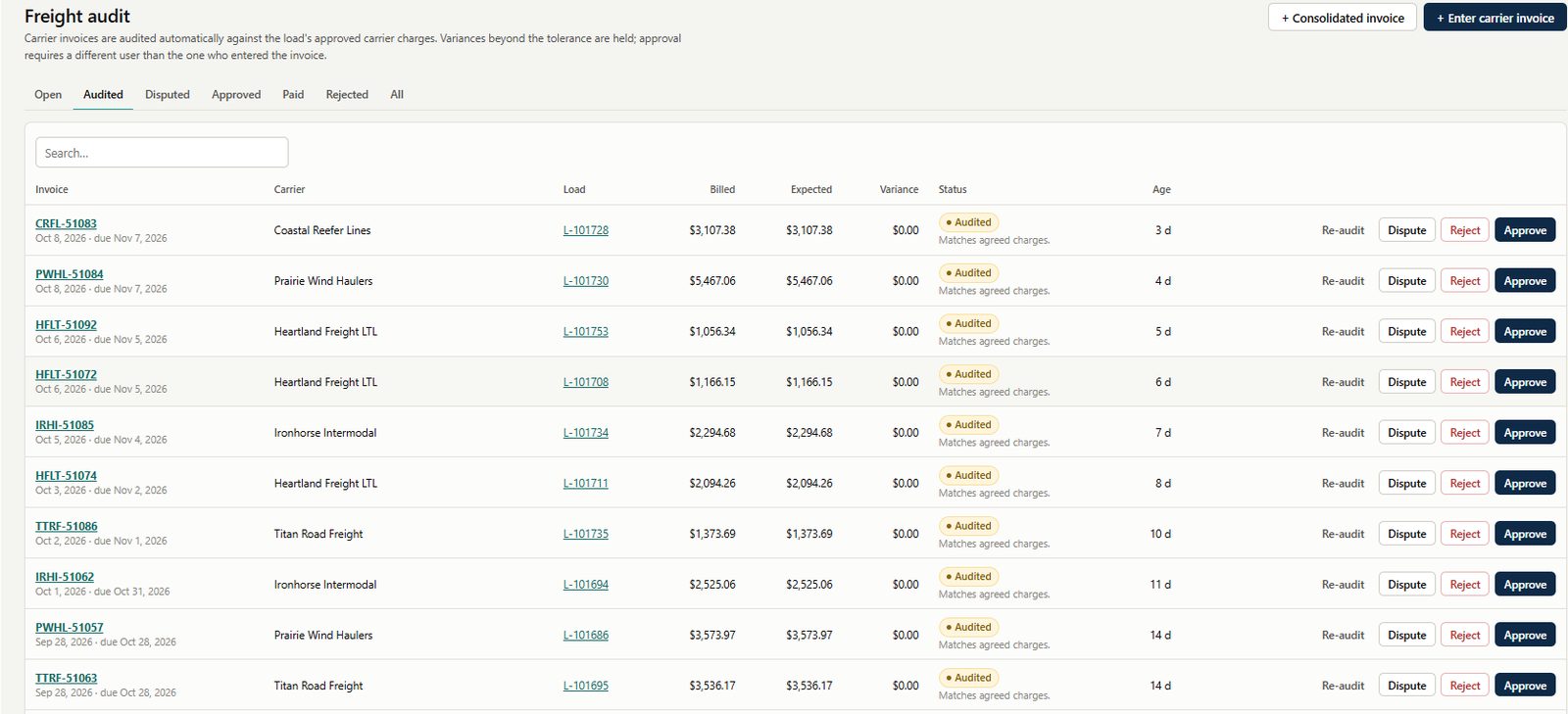
The person who accepts a freight audit can't approve the payment, and no load is paid twice.

Finance and tax

Month-end and tax time, ready when you are

The numbers come straight from the loads you already ran. Odigon prepares them and the export files; your accountant and your filing software take it from there.

Freight audit

Freight audit

Every carrier invoice, single or consolidated, is checked line by line against the agreed charges. Overcharges are disputed before they're paid.

Carrier payments and the 1099-NEC list

Carrier payments and the 1099-NEC list

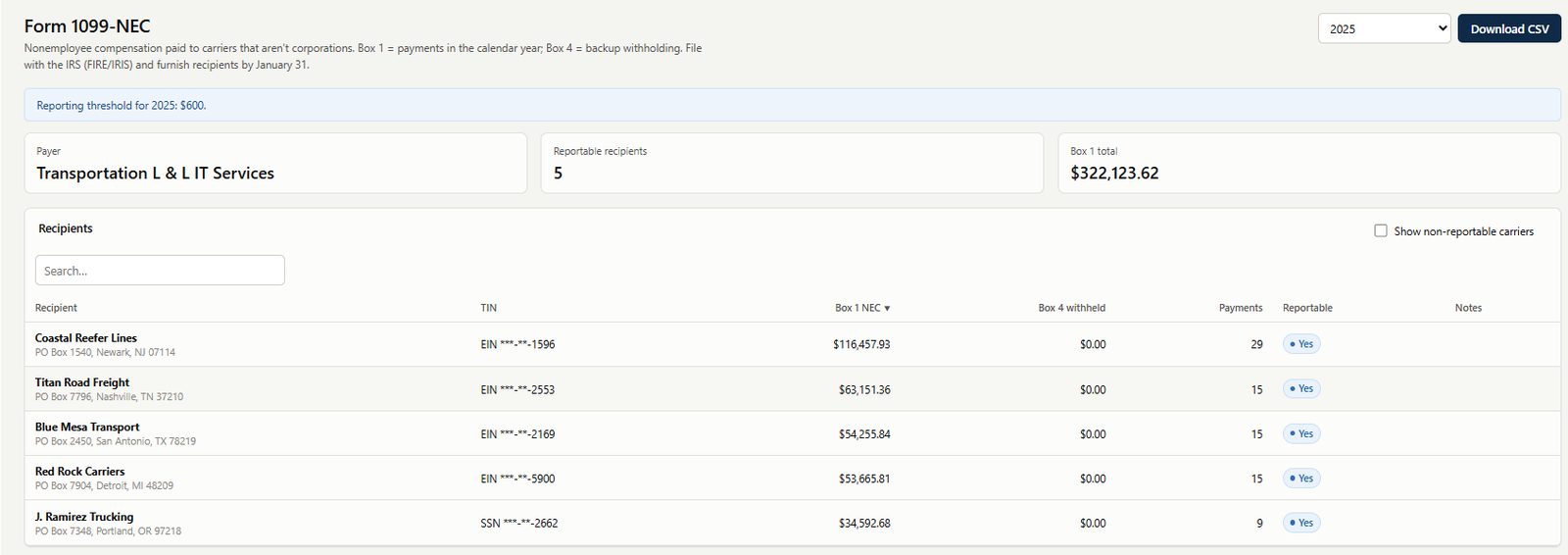
Record the payments you make to carriers (ACH, check, wire, QuickPay) with 24% backup withholding when it applies. For each calendar year Odigon totals Box 1 and Box 4 per carrier, applies the reporting threshold, leaves out exempt corporations, flags carriers without a W-9 and exports a CSV for your tax-filing software or accountant. Odigon records payments but doesn't send money, and it doesn't file 1099s with the IRS or send them to carriers.

IFTA return, prepared for filing

IFTA return, prepared for filing

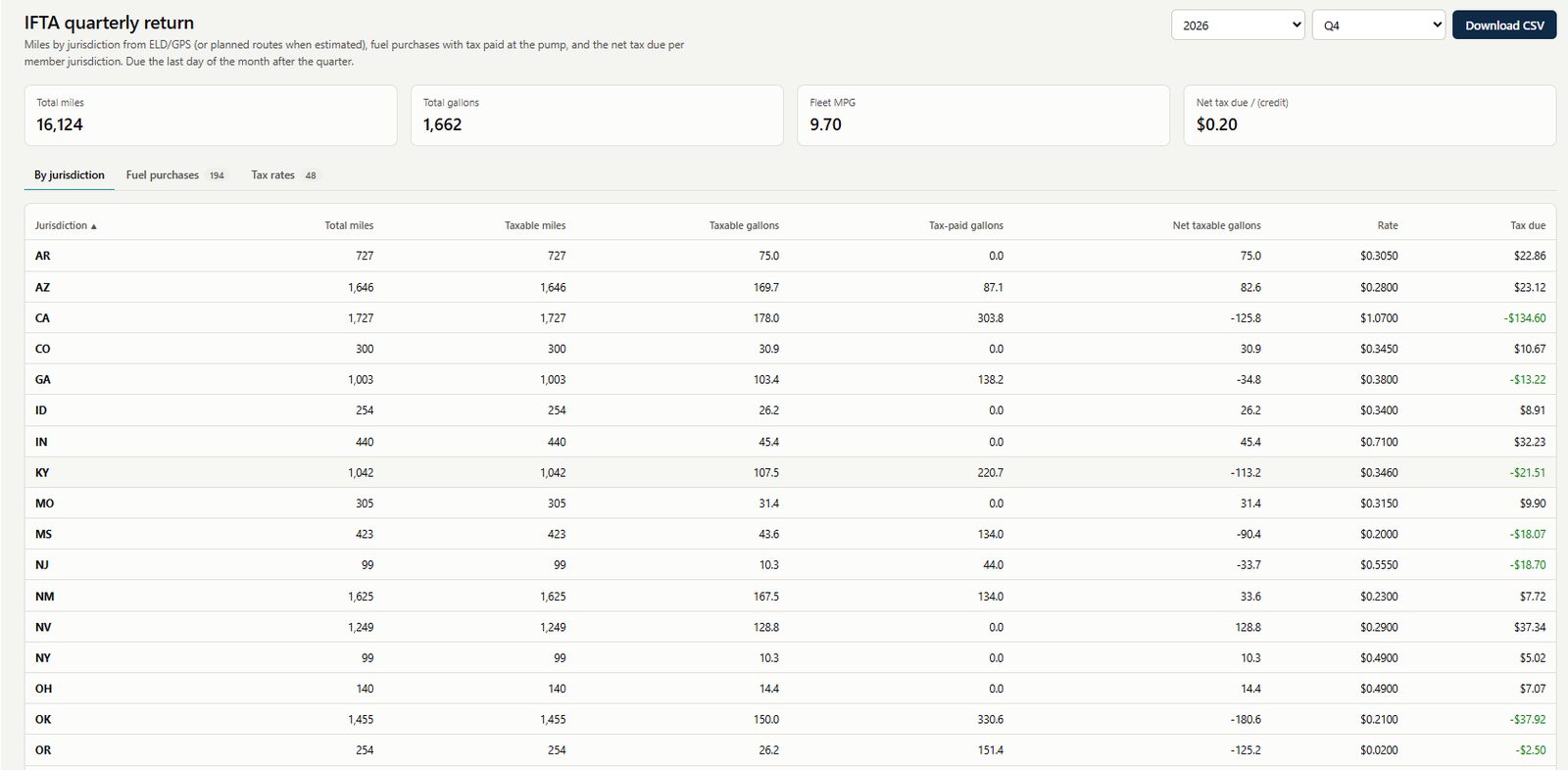
Odigon gathers the backup: miles by jurisdiction from ELD/GPS (or planned routes, marked as estimated), fuel purchases with tax paid at the pump, and the tax rates you enter from the IFTA quarterly matrix. It calculates fleet MPG, taxable gallons and tax due or credit by jurisdiction, warns about missing rates or miles without fuel, and exports the return as CSV. You or your preparer file it with your base jurisdiction.

Odigon is not an accounting or tax-filing system. It prepares accurate numbers and export files from your loads; your general ledger, accounts receivable and the filings themselves stay in your accounting system and with your accountant.

See the 1099-NEC detail, box by box

1099-NEC export

What the 1099-NEC file gives your accounting system, box by box

Finance → 1099-NEC → Export CSV produces one row per paid carrier. Here is exactly what it contains, what Odigon fills on the form, and what your accounting system has to get somewhere else.

Columns in the CSV today

TaxYearRecipientTinTypeTinMaskedAddressBox1NonemployeeCompensationBox4FederalWithheldReportableNote
Form fieldOdigon provides?Source / comment
Calendar year✓ YesTaxYear.
Payer's name, address, phone! PartlyNot in the CSV. The name and address exist in Odigon's company record but aren't exported.
Payer's TIN (EIN)✕ NoOdigon doesn't store your company's EIN. It must come from the accounting system.
Recipient's TIN! Masked onlyOnly ***-**-1234 plus the type (EIN or SSN). The full TIN is stored encrypted and is deliberately never exported; the accounting system takes it from its own vendor W-9 record.
Recipient's name✓ YesRecipient: the W-9 legal name, or the carrier's name if no legal name was entered.
Street, city, state, ZIP✓ Yes, as one fieldAddress: the remit-to address, or the carrier's address if none. One text field, so it needs splitting for the IRS format.
Account number✕ NoOptional on the form. The accounting system can use its own vendor ID.
2nd TIN notice✕ NoComes from IRS B-notices, which the accounting system tracks.
Box 1 · Nonemployee compensation✓ YesSum of carrier payments by date paid in the calendar year.
Box 2 · Direct sales of $5,000 or more✕ NoDoesn't apply to freight carriers. Leave it blank.
Box 3 · Excess golden parachute✕ NoDoesn't apply to carriers.
Box 4 · Federal income tax withheld✓ YesBackup-withholding amounts recorded on the payments.
Boxes 5–7 · State tax withheld, state / payer's state no., state income✕ NoOdigon doesn't track state withholding or the payer's state ID numbers; they come from accounting or payroll. Box 7 is usually equal to box 1 for the recipient's state.

Logic Odigon applies

  • Reportable flag: a row is True only when total payments meet the yearly threshold ($600 through 2025, $2,000 from 2026, or your own override) and the carrier isn't a corporation (C-corp, S-corp, or an LLC taxed as either).
  • Rows aren't filtered: every paid carrier appears, so the accounting system should import only Reportable = True.
  • Note field: explains each exclusion and flags a missing W-9 or TIN.

What your accounting system must capture elsewhere

  • Your company's EIN, state payer ID numbers and contact details.
  • The recipient's full TIN, from the W-9.
  • State withholding and state income (boxes 5–7), the 2nd TIN notice and the account number.

Odigon prepares the numbers; it doesn't file with the IRS or send forms to carriers. Not tax advice: confirm thresholds and rules with your tax advisor.

Ready to take control of your freight?

See Odigon working with your own lanes, carriers, drivers and loads.